
Electricity consumers in Nagaland can now easily pay their electricity bills online without visiting the electricity office. The electricity supply in the state is managed by the Department of Power, Government of Nagaland, which provides power to homes, businesses, and industries across the state.
To make bill payment easier, the department offers multiple payment options such as online portals, mobile apps, UPI payments, net banking, debit cards, credit cards, and offline payment counters.
In this guide, you will learn how to check your electricity bill and pay it step-by-step using online and offline methods in simple language.
About Nagaland Electricity Department
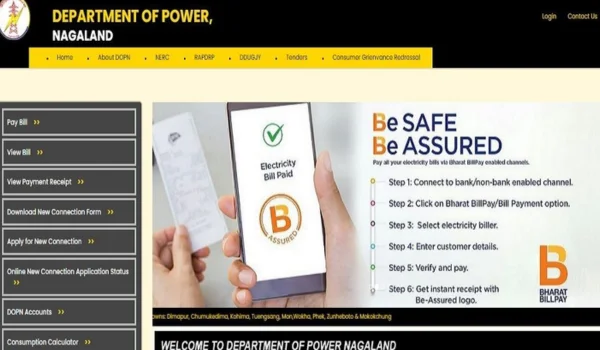
The Department of Power, Government of Nagaland is responsible for electricity generation, transmission, and distribution across the state.
The department supplies electricity to major cities such as:
- Kohima
- Dimapur
- Mokokchung
- Tuensang
- Wokha
Consumers in these areas receive monthly electricity bills and must pay them before the due date to avoid late payment charges.
Details Required for Nagaland Electricity Bill Payment
Before paying the electricity bill, keep the following details ready:
- Consumer Number / Consumer ID
- Account ID or Service Number
- Registered Mobile Number
- Latest electricity bill (optional)
The Consumer Number is printed on your electricity bill and is required to check and pay the bill online.
How to Check Nagaland Electricity Bill Online
Consumers can easily check their electricity bill online through the official website of the Department of Power, Government of Nagaland.
Step-by-Step Process
- Visit the official website of the Nagaland Power Department.
- Go to the Online Services or Bill Payment section.
- Click View Electricity Bill.
- Enter your Consumer Number or Account ID.
- Click Submit.
- Your bill amount, due date, and billing details will appear on the screen.
You can also download or print the bill for your records.
Online Methods for Nagaland Electricity Bill Payment
Consumers can pay their electricity bill online using several digital payment methods.
- Pay Electricity Bill Through Official Website
The easiest method is paying through the official portal of the Department of Power, Government of Nagaland.
Steps
- Visit the official website.
- Click Pay Electricity Bill.
- Enter your Consumer Number.
- Verify the bill details.
- Select the payment option:
- UPI
- Net Banking
- Debit Card
- Credit Card
- Complete the payment.
- Download the payment receipt.
You will receive SMS confirmation after successful payment.
- Pay Electricity Bill Using UPI Apps
UPI apps are one of the easiest ways to pay electricity bills in India.
You can use apps such as:
- PhonePe
- Paytm
- Google Pay
Steps
- Open the payment app.
- Tap Bill Payments.
- Select Electricity.
- Search for Nagaland Electricity Department.
- Enter your Consumer Number.
- Click Fetch Bill.
- Pay using UPI or bank account.
After payment, you will receive instant confirmation and transaction ID.
- Pay Electricity Bill Using Net Banking
Consumers can also pay their electricity bills using internet banking.
Steps
- Login to your internet banking account.
- Go to Bill Payments or Utility Payments.
- Select Electricity.
- Choose Nagaland Electricity Department.
- Enter your Consumer Number.
- Confirm the payment.
The system will generate a digital receipt after payment.
- Pay Electricity Bill Using Debit or Credit Card
Another convenient option is paying through debit or credit cards.
Steps
- Visit the electricity bill payment page.
- Enter your Consumer Number.
- Select Debit Card or Credit Card.
- Enter your card details.
- Complete OTP verification.
After successful payment, the system will generate a payment receipt.
Offline Methods for Nagaland Electricity Bill Payment
Some consumers prefer paying bills offline. The electricity department provides offline payment options as well.
- Pay at Electricity Department Office
Consumers can visit the nearest office of the Department of Power, Government of Nagaland.
Steps
- Carry your electricity bill or consumer number.
- Visit the billing counter.
- Pay using:
- Cash
- Debit card
- Cheque
- Collect the official payment receipt.
- Pay at Authorized Bill Collection Centers
The electricity department also provides authorized bill collection counters in different areas of Nagaland.
Consumers can pay their electricity bills using:
- Cash
- Debit card
- Digital payment methods
Common Electricity Bill Payment Problems
Sometimes consumers may face small problems while paying their electricity bill.
- Consumer Number Not Working
If the consumer number is not working:
- Check the number printed on your electricity bill.
- Make sure there are no typing errors.
- Payment Failed but Money Deducted
If your money is deducted but the payment fails:
- Wait 24–48 hours.
- The amount is usually refunded automatically.
- Bill Not Updated After Payment
Sometimes the bill status may not update immediately.
Solution:
- Wait a few hours.
- Keep the payment receipt or transaction ID.
Helpful Tips for Electricity Consumers
Here are some useful tips to make electricity bill payment easier:
✔ Always pay your electricity bill before the due date to avoid penalties.
✔ Save your Consumer Number on your phone.
✔ Use UPI apps for quick payments.
✔ Keep digital copies of payment receipts.
✔ Check your electricity bill every month to track electricity usage.
Benefits of Paying Electricity Bills Online
Online electricity bill payment offers several advantages:
- Saves time and travel cost
- No need to stand in long queues
- Instant payment confirmation
- Secure digital transactions
- Easy payment from home anytime
Because of these benefits, more consumers are switching to digital payment methods.
Conclusion
Paying the Nagaland electricity bill online is now very simple and convenient. Consumers can easily check their electricity bill and pay it through the official website, UPI apps like PhonePe and Paytm, net banking, debit cards, or credit cards.
For those who prefer offline methods, electricity bills can also be paid at electricity department offices and authorized collection centers.
Using digital payment options helps consumers save time, avoid queues, and ensure timely electricity bill payments. Always keep your Consumer Number ready and check your electricity bill regularly for a smooth and hassle-free experience.