
Electricity bills are a regular part of every household and business in India. If you live in Gujarat and are a consumer of Paschim Gujarat Vij Company Limited, then understanding how to complete your PGVCL bill payment is very important.
In this article, I will explain everything in simple language—how to pay your bill online and offline, how to check your bill, download receipts, track payment status, and much more.
What is PGVCL?
PGVCL (Paschim Gujarat Vij Company Limited) is a government-owned electricity distribution company that supplies power to several districts in Gujarat, especially in rural and semi-urban areas.
The company offers multiple convenient ways for consumers to pay their electricity bills, including digital and offline options.
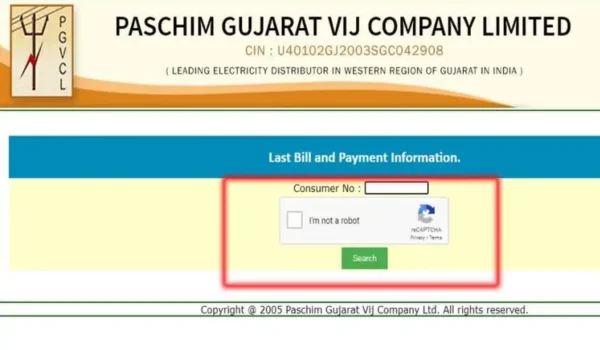
Details Required for PGVCL Bill Payment
Before making your payment, keep the following details ready:
- Consumer Number / Account Number
- Registered Mobile Number
- Email ID (optional but useful for receipts)
Your consumer number is the most important detail—it is printed on your electricity bill.
PGVCL Online Bill Payment (Step-by-Step)
The easiest way to pay your bill is through pgvcl online bill payment. Follow these simple steps:
- Visit the Official Website
Go to the official PGVCL website.
- Click on “Pay Bill”
You will find an option like “Quick Pay” or “Online Payment”.
- Enter Consumer Number
Type your consumer number correctly.
- Check Bill Details
Your bill amount, due date, and other details will appear.
- Choose Payment Method
You can pay using:
- UPI (PhonePe, Google Pay, Paytm)
- Debit Card / Credit Card
- Net Banking
- Complete Payment
Confirm the payment and wait for the success message.
- Save Receipt
After payment, download or screenshot your receipt.
PGVCL Bill Payment Through Mobile Apps
You can also complete your pgvcl online bill payment using popular apps:
- Google Pay
- PhonePe
- Paytm
Steps:
- Open the app
- Go to “Electricity Bill” section
- Select PGVCL
- Enter your consumer number
- Pay via UPI or wallet
These apps also save your details for faster future payments.
Offline PGVCL Bill Payment Methods
If you are not comfortable with online payments, you can still pay your bill offline.
- PGVCL Office
Visit the nearest PGVCL office with your bill and pay using:
- Cash
- Cheque
- Collection Centers
Authorized payment centers also accept electricity bills.
- Banks
Some banks accept electricity bill payments over the counter.
How to Check PGVCL Bill Payment Status
After making payment, you may want to confirm whether it was successful. You can easily check pgvcl bill payment status:
Method:
- Visit the official PGVCL website
- Go to “Payment Status”
- Enter your consumer number
- View status (Paid / Pending / Failed)
This helps you avoid duplicate payments.
PGVCL Bill Payment History
Tracking your previous payments is useful for records and budgeting. PGVCL provides access to your pgvcl bill payment history.
How to Check:
- Login to the PGVCL portal (if registered)
- Go to “Billing History” or “Payment History”
- View past transactions, dates, and amounts
This is helpful for:
- Tax purposes
- Expense tracking
- Dispute resolution
PGVCL Bill Payment Receipt Download
After completing payment, always download your receipt. PGVCL allows pgvcl bill payment receipt download easily.
Steps:
- Visit PGVCL website
- Go to “View Receipt”
- Enter consumer number
- Download PDF receipt
You can also get receipts:
- From mobile apps
- Via email/SMS confirmation
Always keep a copy for future reference.
Common Issues in PGVCL Bill Payment
Sometimes users face problems during payment. Here are common issues and solutions:
- Payment Failed but Amount Deducted
- Wait for 24–48 hours
- If not updated, contact PGVCL support
- Wrong Consumer Number
- Always double-check before paying
- Website Not Working
- Try again later or use mobile apps
- Payment Not Updated
- Check pgvcl bill payment status
- Keep transaction ID safe
Tips for Smooth PGVCL Bill Payment
- Pay before the due date to avoid late fees
- Use UPI for fast and secure payments
- Save your consumer number for future use
- Always download receipt after payment
- Check your pgvcl bill payment history regularly
Benefits of Online PGVCL Bill Payment
Using digital methods for pgvcl online bill payment has many advantages:
- Saves time and travel
- Available 24/7
- Instant confirmation
- Easy access to receipts
- Secure payment options
Customer Support for PGVCL
If you face any issue, you can contact PGVCL customer support through:
- Toll-free helpline
- Email support
- Local office visit
Keep your consumer number and transaction details ready when contacting support.
Conclusion
Paying your electricity bill is now easier than ever with multiple options provided by Paschim Gujarat Vij Company Limited. Whether you choose pgvcl online bill payment, mobile apps, or offline methods, the process is simple and user-friendly.
You can also easily check your pgvcl bill payment status, access your pgvcl bill payment history, and complete pgvcl bill payment receipt download without any hassle.
By following the steps and tips mentioned in this guide, you can ensure timely and smooth bill payments every month.